I have a Nothing Phone (2a) Plus. One of the reasons I liked it was how clean Nothing OS felt. Almost no bloatware.
So I got curious about what runs in the background. I connected it to my laptop over ADB, no root, and started digging.
I found more than I expected.

How I looked
Everything here comes from the phone itself over USB. No root, no decompiling, nothing installed on the phone.
- Network activity comes from Android's own per-app accounting (
dumpsys netstats). It records bytes sent and received in 2-hour buckets. I had 100 days of it, from July 27 to November 3, 2026. - Schedules come from
dumpsys jobscheduleranddumpsys alarm. They show what is set to run and how often. - Code findings come from reading the string tables inside the system APKs and framework jars.
- Live behaviour comes from
logcat, the system log.
What this can't show is what is inside the traffic. Android counts bytes, not content. And finding something in the code shows what the software can do, not proof that it does it every time.
The phone is a Nothing Phone (2a) Plus (A142P) on Android 16, security patch October 2026, bootloader locked.
The built-in services
| Service | What it does |
|---|---|
| Nothing Experience | Collects analytics events into a local queue |
| LogKit | Collects system logs and queues them for upload |
| Nothing Proxy | Runs Nothing's internal event pipeline, fetches remote configs, keeps a sleep log |
| Nothing ThirdParty | Has its own event tracking receiver, tied to Glyph features |
| ironSource Aura | Third-party app manager from an ad company, preinstalled |
The first four run as the Android system user (UID 1000). That is the same identity as the core OS, so Android can't separate their network traffic from the rest of the system. They are missing from the network charts below for that reason, not because they are quiet.
They are also wired into the OS itself. Android's core framework, which is loaded into every app, references Nothing's event tracker (com.nothing.experience.AppTracking). The system server has a helper called NtKafkaEventHelper that produces events. System UI has its own tracking upload alarm.
About that name. The pipeline is called NtKafka. It borrows its terms from Apache Kafka (producers and observers), but the actual Kafka library is not on the phone. It is Nothing's own event bus.
What an analytics event carries
Nothing Experience stores events in a local database before they get sent. Every row has these columns.
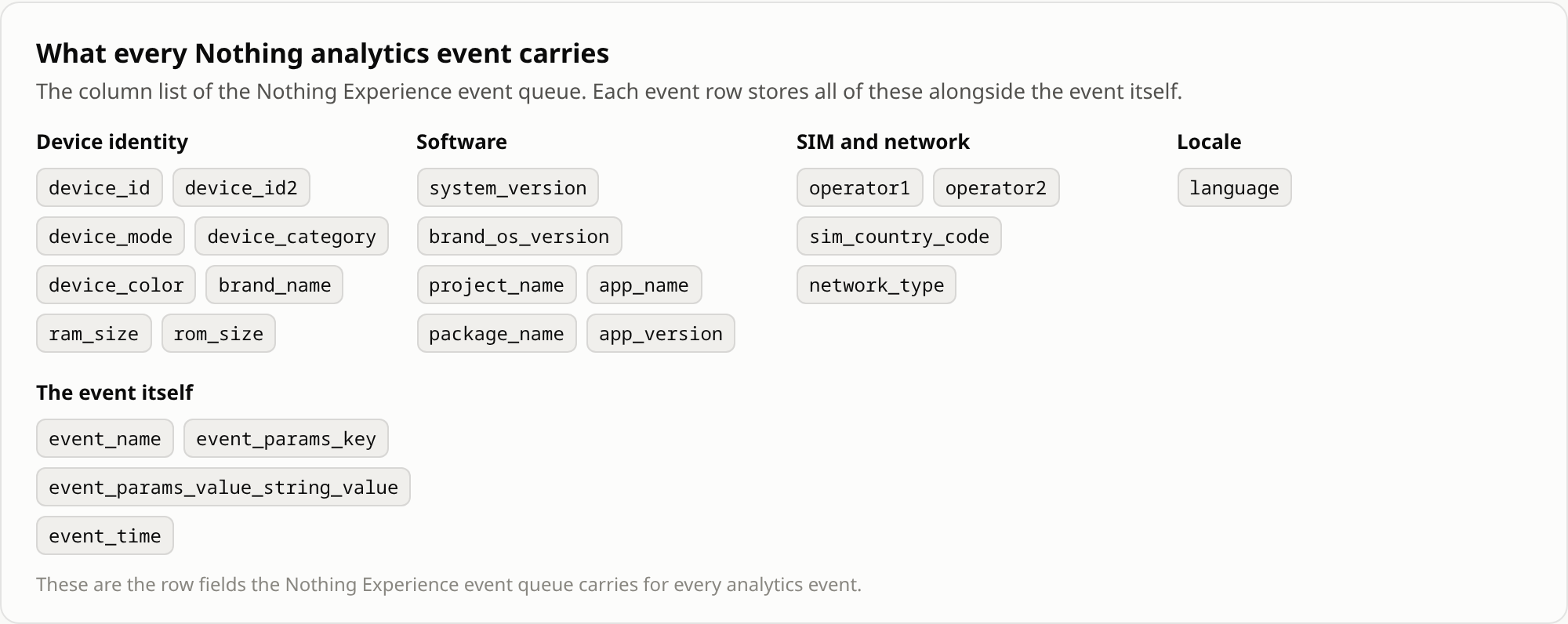
That is 23 columns, including two device IDs, both SIM carriers, SIM country, network type and language. The queue was empty when I checked, so this is the structure, not values I saw being sent.
The code points at three endpoints.
dc-api.nothingtech.link/mobile/activate
dc-api.nothingtech.link/mobile/behavior
dc-api.nothingtech.link/mobile/quality
When they run
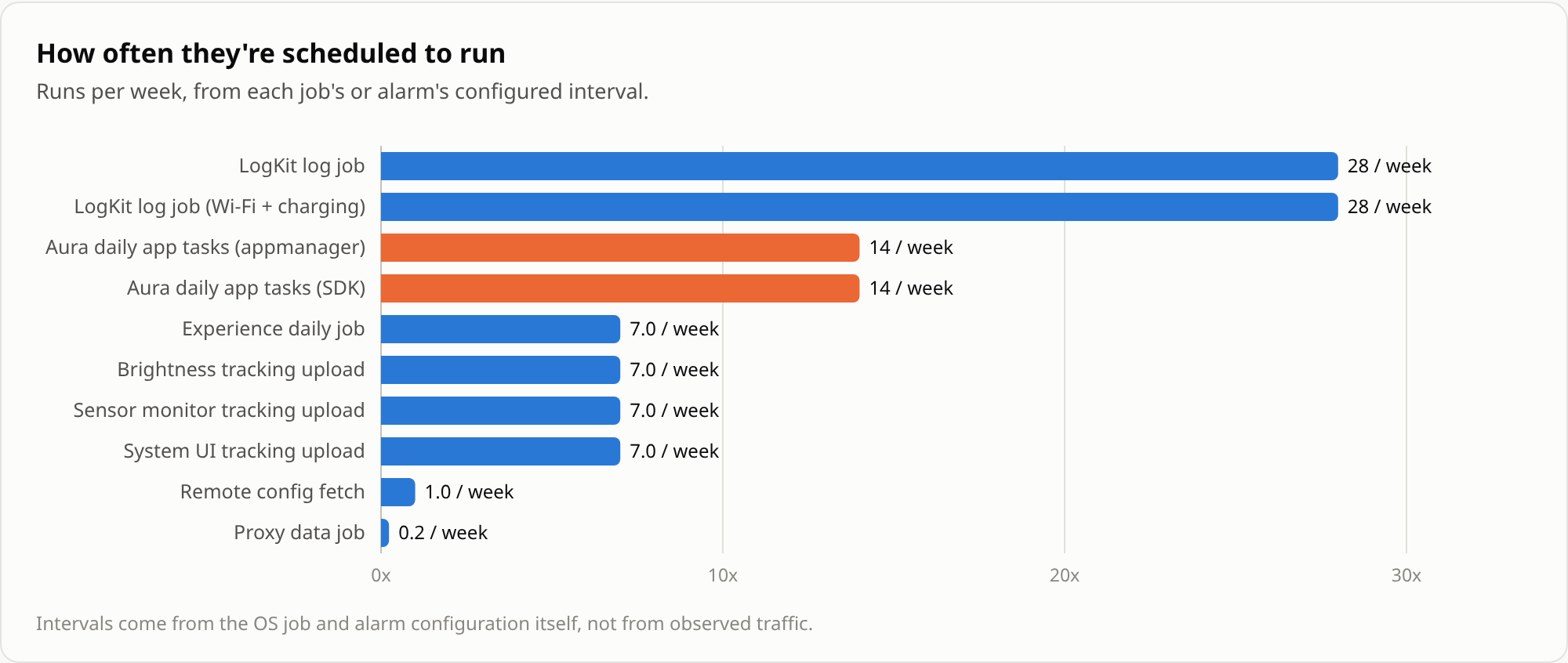
| Job | How often |
|---|---|
| LogKit log jobs | every 6 hours (two jobs, one only on Wi-Fi while charging) |
| ironSource Aura app tasks | every 12 hours (two jobs) |
| Experience daily job | daily |
| Brightness, sensor and System UI tracking uploads | every midnight |
| Remote config fetch | weekly |
| Proxy data job | monthly |
These intervals come from the phone's own job and alarm settings, not from watching traffic.
How often they go online
Some preinstalled components do have their own network identity, so their traffic can be measured.
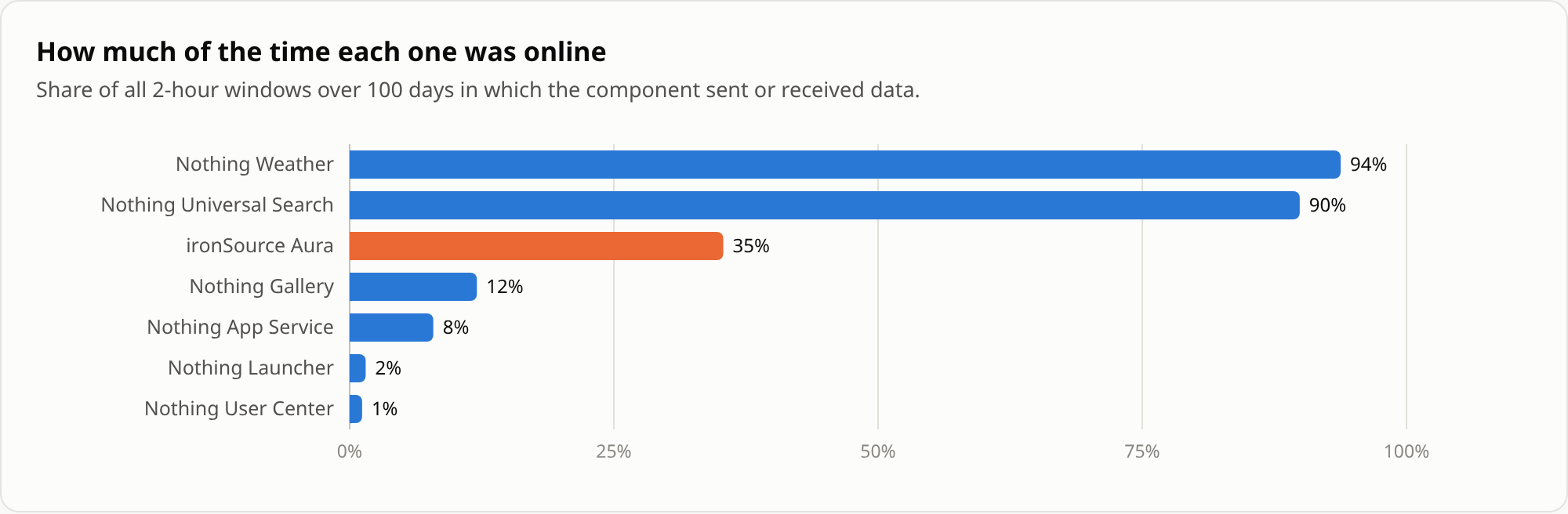
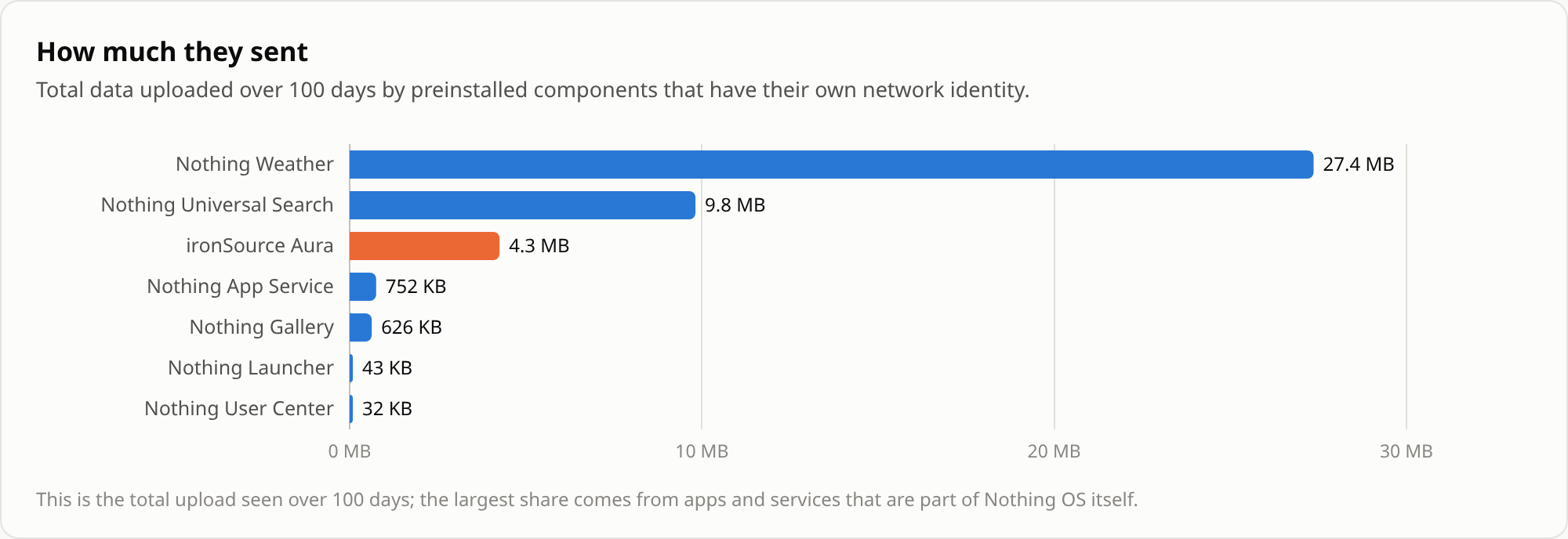
Nothing Weather and Universal Search were online in 94% and 90% of all 2-hour windows, every day for 100 days. Weather probably refreshes the widget, so some of that makes sense. It still adds up to 27 MB sent.
ironSource Aura
This one surprised me. ironSource is an ad company. Aura is their "app manager", and it comes preinstalled in the system image.
It has permission to install apps without the Play Store (INSTALL_PACKAGES) and to see every app on the phone (QUERY_ALL_PACKAGES). It starts at boot and listens for SIM card changes. It also updated itself in June.
I never opened it. Usage records show 0 launches since February. It was still online on 100 of 100 days.
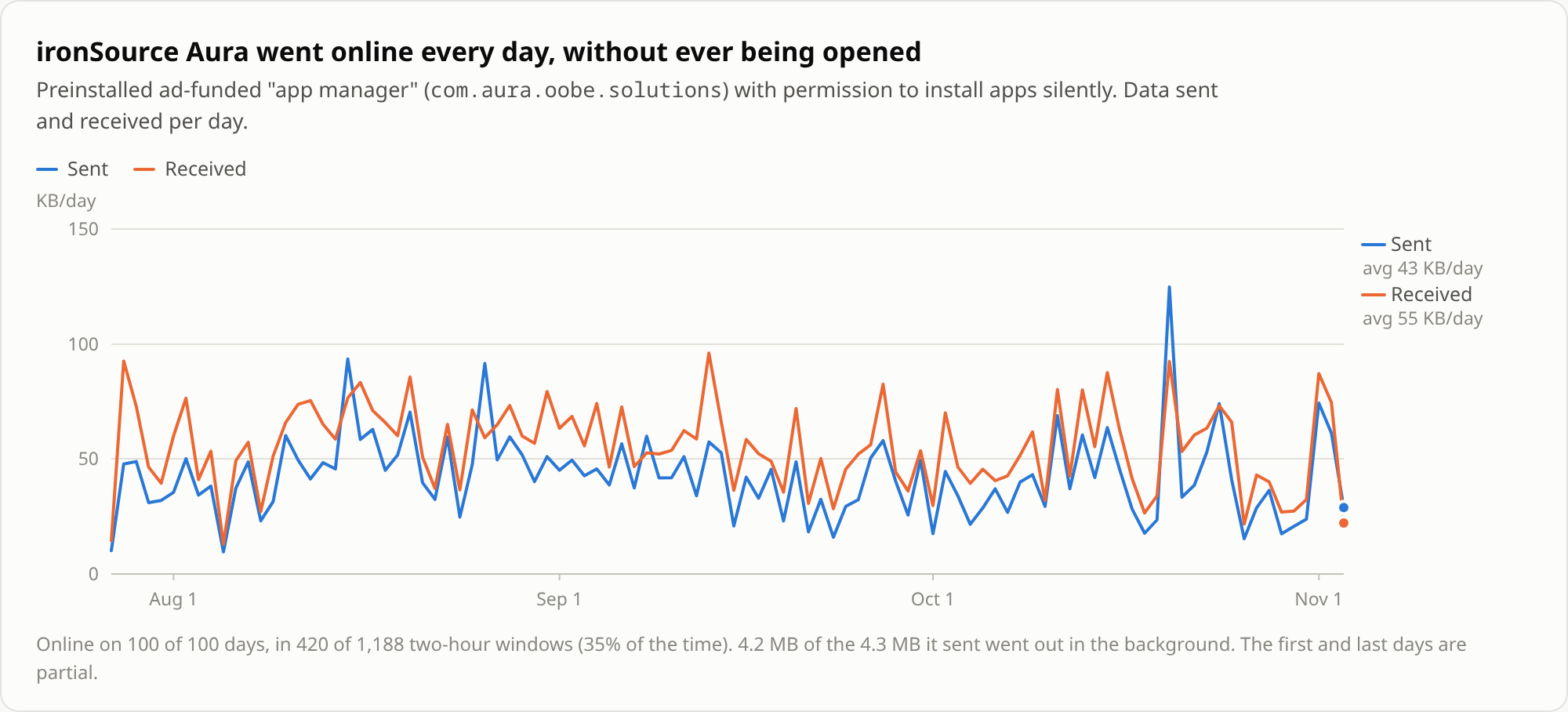
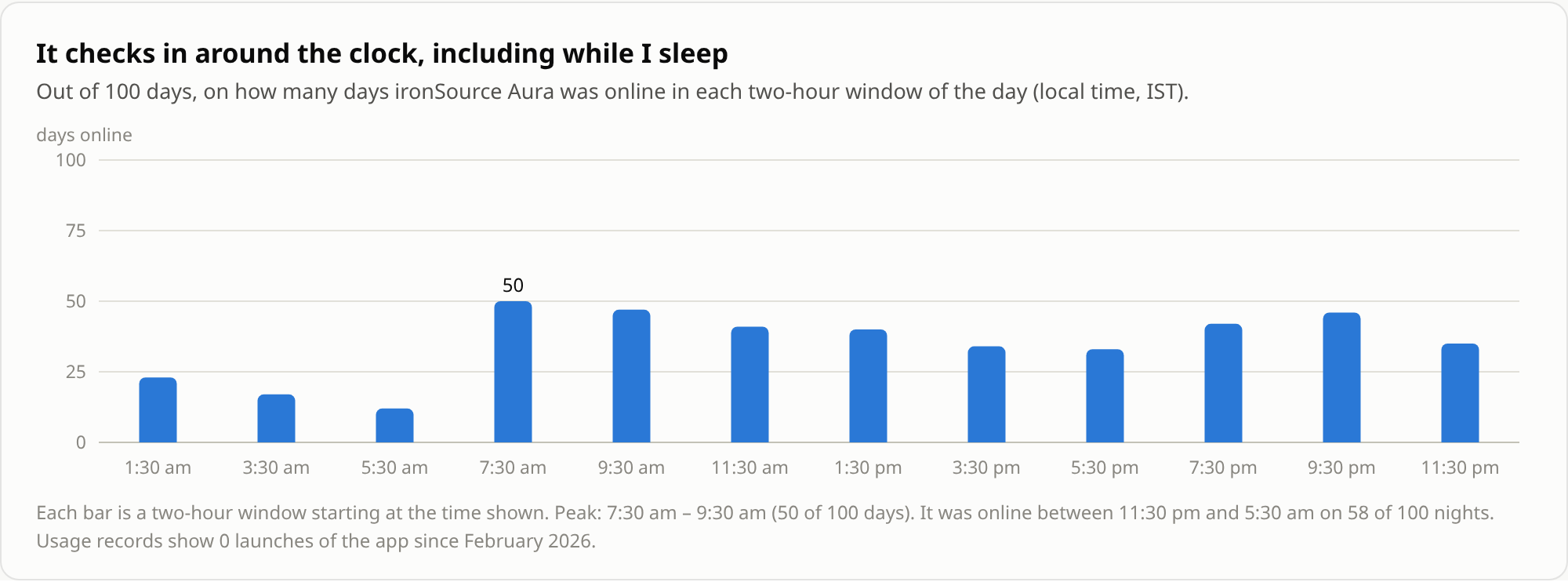
It was online in 35% of all 2-hour windows, including 58 of 100 nights between 11:30 pm and 5:30 am. 98% of what it sent went out in the background. On my phone it had not installed any other apps.
The remote configs
This is the part I found most interesting.
Nothing Proxy keeps a store of configs pushed from Nothing's servers. It fetches them once a week. There are 35 of them.
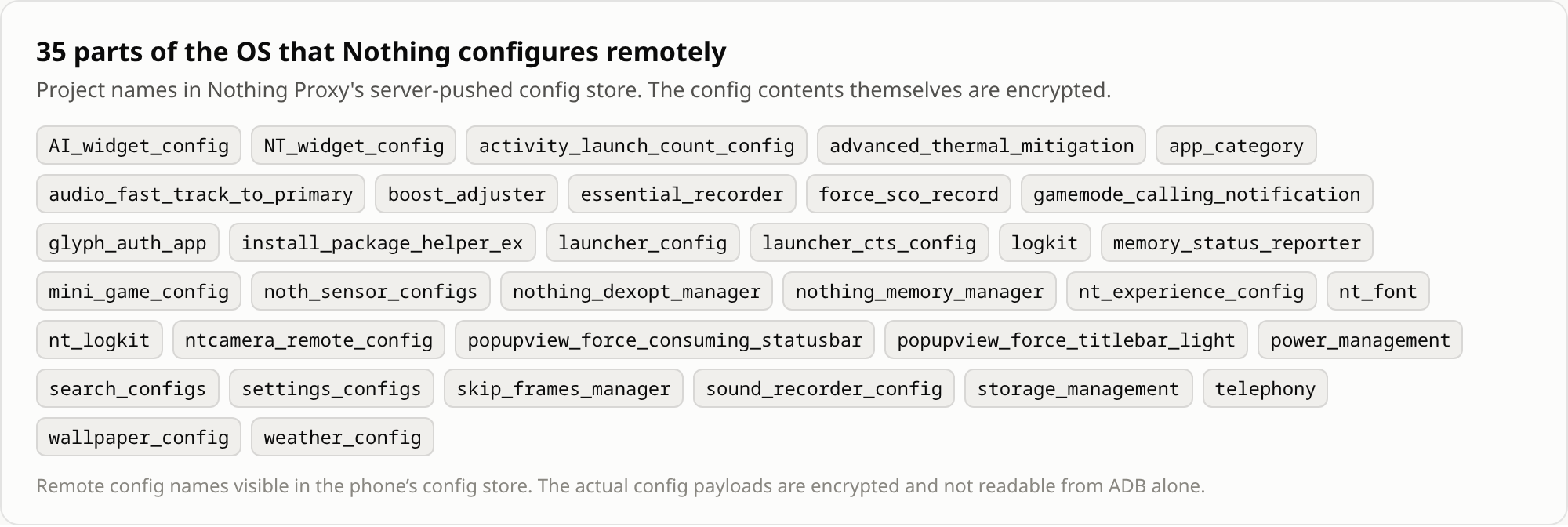
They cover things like thermal mitigation, CPU boost, memory management, power management, the launcher, telephony and the camera. The contents are encrypted, so I can't see what is inside.
So Nothing can change how parts of the phone behave without shipping an OS update.
Is it remote code?
No. This is remote config, not remote code. I checked two things.
- None of Nothing's apps reference Android's runtime code loaders or the usual hotfix and plugin frameworks.
- The configs are small. All 35 add up to 293 KB, and most are under 8 KB. The biggest is
app_categoryat 260 KB, which by its name is probably a list that sorts apps into categories.
Lots of apps and phones work this way. Firebase Remote Config does the same thing for apps.
What about CPU limits?
The configs are named after performance features, so I looked at what those features do on the phone.
Nothing's boost service (NtBoostAdjusterImpl) listens for thermal changes and sets CPU speed limits for each heat level. When the thermal level changed, it logged this.
use cpu local config, level: 1
cpu boost params: 4194304,480000,4210688,2000000,4194560,400000,4210944,2700000
Those numbers are MediaTek performance commands, and the power service confirmed them right after. At that level the fast cores get a max of 2.7 GHz out of 3.0. The word "local" suggests there is also a non-local version of these values, which would match the boost_adjuster config in the remote store.
I also ran a quick load test. While charging over USB, the fast cores stopped at 2.3 GHz. The log showed that limit came from MediaTek's own thermal service (thermal_core) right after I plugged in the cable, not from Nothing. Limiting the CPU while charging is common, because charging and heavy load together heat up the battery.
So the mechanism to change performance settings remotely is there. In theory that could include CPU limits.
Does this mean they are secretly slowing phones down? No. I found no evidence of that, and since the configs are encrypted I can't prove it either way. But the capability is interesting.
The sleep log
Nothing Proxy has a feature called "sleeptight". It stores each night's longest screen-off stretch, with start time, end time and timezone. Mine went back more than a year. It is stored on the phone, and I could not tell whether it gets uploaded.
I'm not sharing that chart. It is literally my sleep schedule.
What it costs
Very little. Nothing's analytics processes used 0.08% of CPU time since the last full charge. They do hold about 62 MB of RAM all the time, because they never stop running.
Not just Nothing
My own apps were worse. 123 of my 157 installed apps ship at least one analytics, crash reporting or ad SDK.
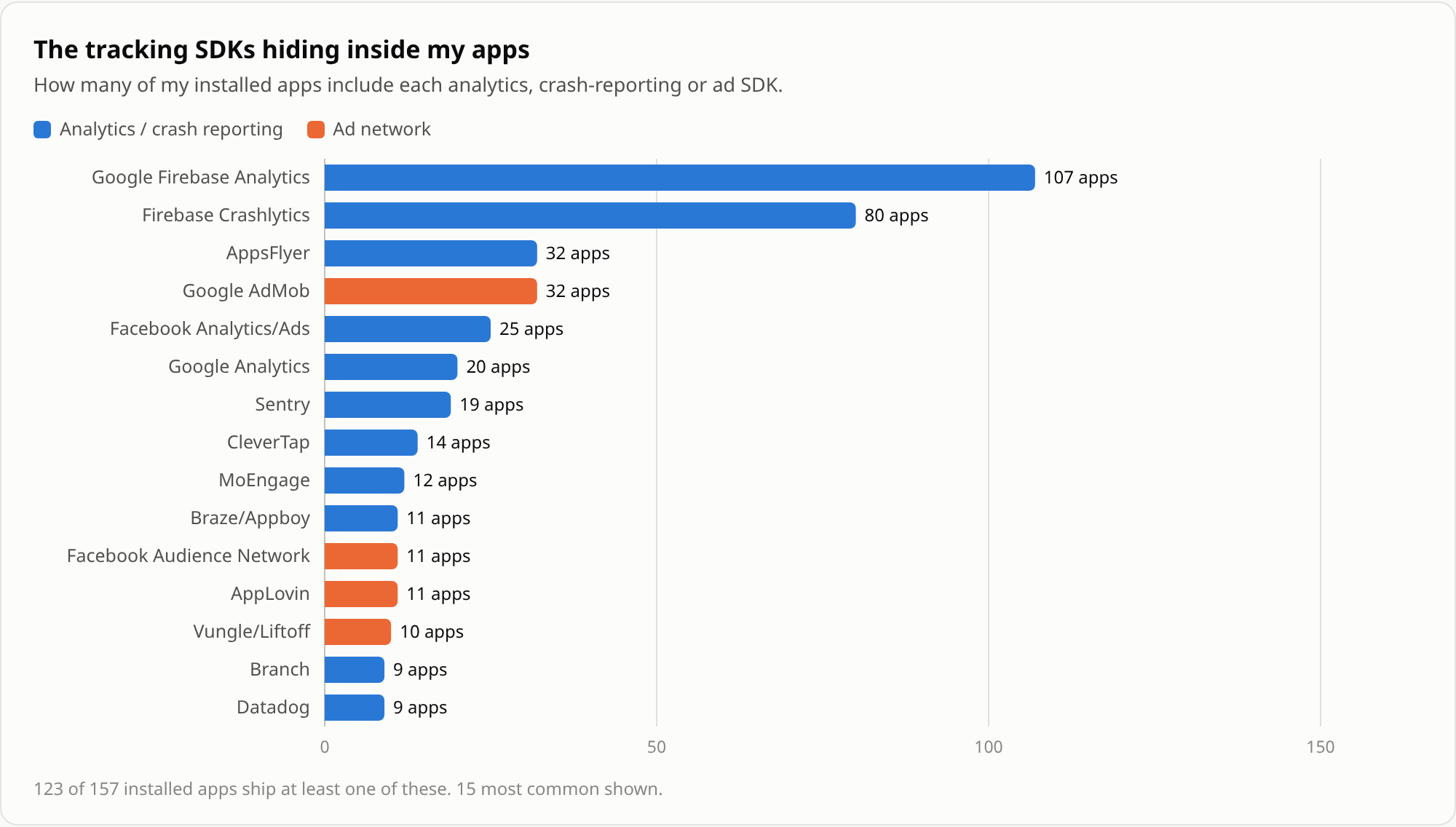
Firebase Analytics alone is in 107 of them. Finding an SDK in an app means the app ships it, not that it is active. Obfuscated SDKs can be missed, so this is a lower bound.
Google's preinstalled Location History also has "all the time" location and activity recognition, and it uploaded 60 MB in the background over the 100 days.
What I did
- Uninstalled ironSource Aura, Google Feedback, a MediaTek debug logger and some bloat
- Disabled Nothing Experience and LogKit. They can't be uninstalled because they run as the system user
- Left Nothing Proxy and ThirdParty alone, since Glyph and power features depend on them
- Removed 20 apps I hadn't opened in months
Everything is reversible and needs no root.
# remove an app for your user
adb shell pm uninstall --user 0 <package>

# bring a preinstalled app back
adb shell cmd package install-existing <package>

# for system apps that refuse to uninstall
adb shell pm disable-user --user 0 <package>
adb shell pm enable --user 0 <package>
Don't remove packages you don't recognise. Some of them are needed for the phone to work.
Closing
Maybe this is standard practice across the industry. A lot of it probably is. I still didn't expect this much running in the background on a phone marketed around a clean Android experience.
All of this with ADB. No root required.
Data
The non-personal data behind the charts.
- components_summary.csv shows how often each preinstalled component was online and how much it sent
- components_daily.csv has the same numbers per day
- schedule.csv lists the job and alarm intervals
- event_fields.csv lists the columns in the analytics event queue
- remote_config_projects.csv lists the names of the 35 remote configs
- endpoints.csv lists the analytics endpoints found in the code